If you’re looking to enhance your cleaning routine with a Lefant robot vacuum, you’ve come to the right place. These smart and efficient devices offer an easy way to maintain a clean home without lifting a finger. In this comprehensive guide, we’ll walk you through the steps for setting up your Lefant robot vacuum and getting the most out of its advanced features. Whether you’ve just bought a Lefant M1 or a Lefant F1, setting it up is simple, and we’re here to make sure you do it right.
Why Choose a Lefant Robot Vacuum?
Before we dive into the setup process, you may be wondering why you should choose a Lefant robot vacuum. With models like the Lefant M1 and Lefant F1, you get cutting-edge cleaning technology paired with intuitive design. These vacuums are perfect for busy households, offering features like app control, automatic charging, and strong suction power. If you value convenience and efficiency, a Lefant vacuum cleaner could be the ideal solution.
The Lefant series of robot vacuums offers multiple benefits such as advanced mapping capabilities, multiple cleaning modes, and voice assistant integration. These features make it easier than ever to clean your home while keeping your routine simple.
Unboxing Your Lefant Robot Vacuum
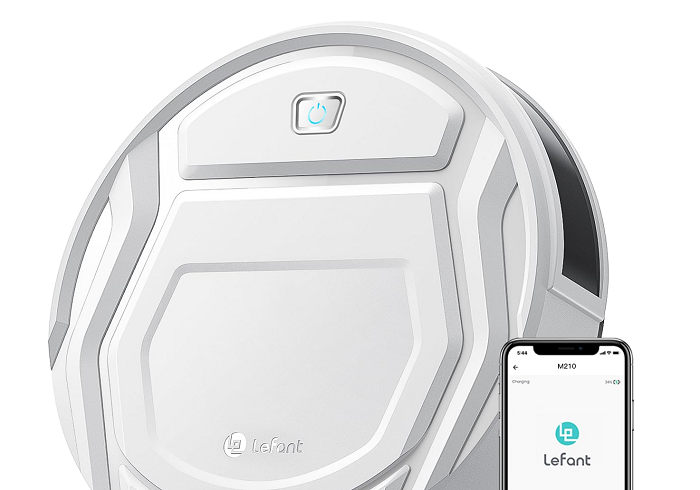
Once you’ve unboxed your Lefant robot vacuum, it’s time to prepare it for its first cleaning session. Inside the box, you will typically find the Lefant robot vacuum, a charging station, and any necessary accessories such as side brushes and a user manual.
To start, make sure the Lefant robot vacuum is fully charged. Place it on the charging dock and let it charge for at least 3 hours, or until the battery is fully charged. A fully charged vacuum ensures optimal performance and longer cleaning sessions.
Setting Up the Lefant Robot Vacuum with the App
One of the standout features of many Lefant robot vacuums is their ability to be controlled via a smartphone app. To begin, download the official Lefant app from the App Store or Google Play. Once the app is installed, open it and follow the on-screen instructions to connect the robot vacuum to your Wi-Fi network.
If you have a Lefant M1 or Lefant F1, the app will automatically detect the vacuum once it’s powered on and in pairing mode. If you run into any issues, make sure your Wi-Fi network is 2.4GHz, as most Lefant models do not support 5GHz networks.
Mapping and Customizing Your Cleaning Schedule
After connecting your Lefant robot vacuum to the app, it’s time to map your home. The mapping process allows the vacuum to create a floor plan of your home, optimizing its cleaning path. Start by allowing the vacuum to do a full sweep of your home without interruptions.
You can then customize the cleaning schedule within the app. This allows you to set specific times for your vacuum to clean, making it a truly hands-off experience. Additionally, many Lefant vacuums have a “no-go zone” feature, allowing you to set areas that the vacuum should avoid, like fragile furniture or pet areas.
Troubleshooting Common Lefant Robot Vacuum Issues
Though the Lefant robot vacuum is designed for ease of use, sometimes issues can arise. Here are a few common problems and how to fix them:
-
Vacuum not charging: If your Lefant vacuum isn’t charging, make sure the charging contacts are clean. A buildup of dust or debris can prevent proper charging.
-
App connection issues: If your vacuum isn’t connecting to the app, try restarting both your vacuum and your router. Ensure that your Wi-Fi network is stable and in range.
-
Vacuum not cleaning efficiently: If you notice that the vacuum is missing spots, check the side brushes to ensure they are in good condition. Sometimes the brushes can become clogged with dirt, affecting cleaning performance.
Maintaining Your Lefant Robot Vacuum
To ensure that your Lefant robot vacuum continues to work efficiently, regular maintenance is important. Here are a few tips:
-
Clean the brushes regularly: Side brushes and the main brush should be checked for hair and debris that might have gotten tangled.
-
Empty the dustbin: Empty the dustbin after every cleaning cycle to ensure that the vacuum operates at maximum capacity.
-
Check the filter: Clean or replace the filter every few months to maintain optimal air quality and suction power.
Enjoy a Cleaner Home with Lefant
With your Lefant robot vacuum set up and ready to go, you can now enjoy the convenience of automated cleaning. Whether you have a Lefant M1, F1, or any other model, following these setup steps ensures that your vacuum performs at its best. From unboxing to scheduling cleanings, each step is designed for simplicity and effectiveness.
By choosing a Lefant robot vacuum, you’re investing in a cleaner, more efficient home. So sit back, relax, and let your robot vacuum do all the hard work for you!
Support E mail: contactexpert247@gmail.com